Attachments
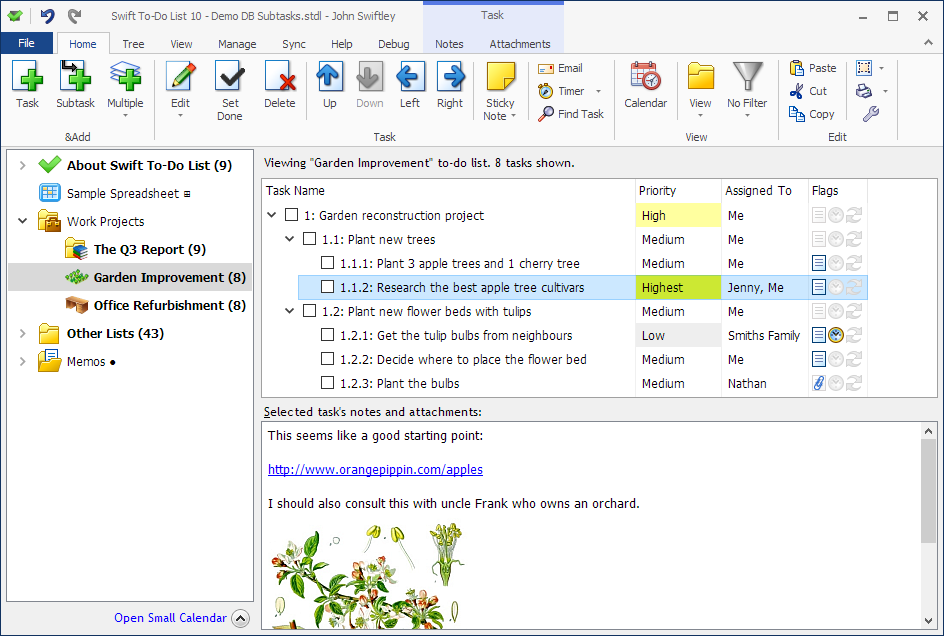
Swift To-Do List allows you to attach files, emails, folder shortcuts, email addresses and web links (URLs) to your tasks. You can easily open or copy the attachments later.
Swift To-Do List can store both shortcuts to files and the actual files (embedded and stored directly in the database).
You can just Drag and Drop files or email messages into the attachment tab (or into the notes area) to automatically attach them.
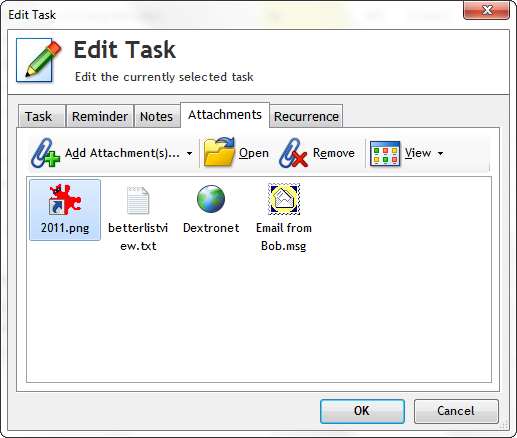
Copy, cut, paste attachments, in or out of Swift To-Do List. Drag and drop attachments both inside and outside of Swift To-Do List. Right-click any file attachment and use Save As... to save the file anywhere. Open the attachments with a simple double-click.
Types of attachments supported
The following types of attachments are supported:
- Files (shortcuts)
- Files (embedded)
- Folders (shortcuts)
- Emails (embedded)
- Email addresses
- Links (URLs)
Embedded attachments
All file shortcut attachments can be easily converted into embedded file attachments. This allows you to store the actual physical files in your Swift To-Do List database. If you bring your database over to another computer, you will still have all your attached files.
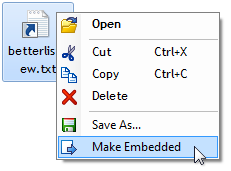
Attach emails from Outlook, Mozilla Thunderbird (...)
Yes, you can attach emails to your tasks! It is possible to Drag and Drop emails from Outlook and some other email clients into Swift To-Do List to attach them to your tasks.
Because many of your task come through email, this is a huge time-saver.
Check out our quick video "How to attach emails".
Also, you can even outright create tasks from emails. When doing the email Drag and Drop into Swift To-Do List, drop the email directly in the task-view or onto a to-do list to create a task from it.
Download Swift To-Do List
Download fully functional 30-day trial:
I have never found a program that will sort out my mess so well. I usually end up with different lists and information all over the place and your program will bring them all together.
And the ability to link or embed files is just heaven sent!
I wish you all the luck you deserve with such a great program.
Paul A, UK
 Tree Notes
 FastPaste
 Mind Collected


 Swift To-Do List 11
 Swift Mind Freedom
 Meta Productivity
 Daily To-Do List