Notes Organizer with Tree Structure
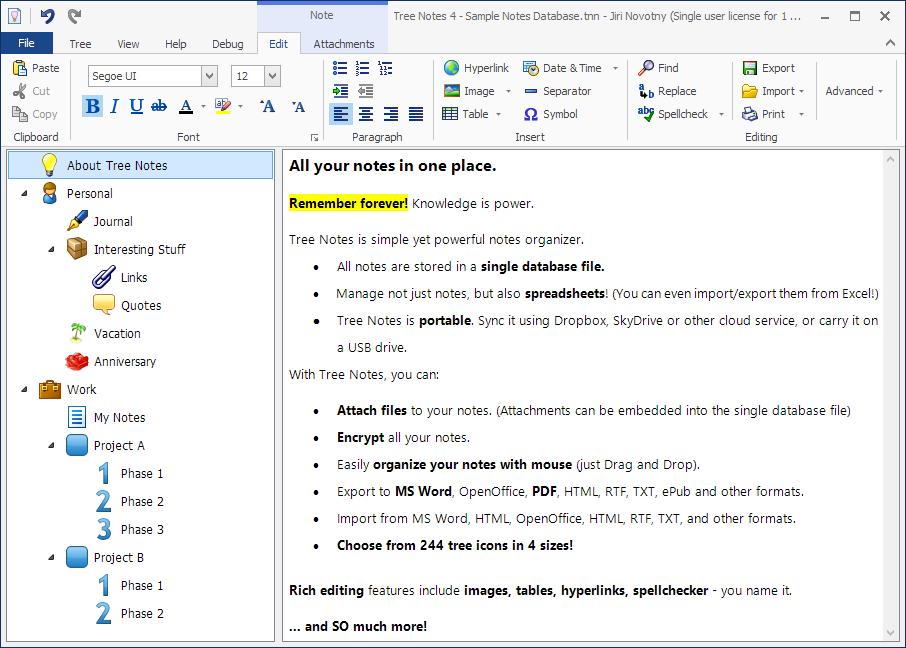
Tree Notes is a notes organizer for Windows that allows you to organize and manage all your notes in a tree structure with icons. Tree Notes is very easy to use and light-weight.
Store and manage unlimited number of notes in a single database file.
Attach files, emails and links to notes. The attached files can be optionally embedded and stored in the Tree Notes database.
And version 2.50 adds numbered bullet lists, multi-level lists (outlines), spellchecker, 100 extra tree icons, better find/replace, ability to import and export extra formats (DOC, DOCX, ODT, HTML, MHT, ePub), improves printing, and adds PDF export. It also makes it possible to paste images.
Version 3.0 also adds many new features, such as the ability to hyperlink to other notes, or the ability to sort all notes alphabetically.
Version 4.0 adds spreadsheets support (you can now manage not just notes, but also spreadsheets, complete with import/export from Excel), new modern ribbon design, support for tables in notes, and many other exciting new features.
Import and export notes of any format
You can both import many different file types, and export your notes any time to any of them:
- Microsoft Word DOC and DOCX files
- HTML files
- Web-archive MHT files
- OpenOffice ODT files
- Rich-text RTF files
- Plain-text TXT files
- ePub files
You can even export notes to PDF.
You can now also manage spreadsheets, and import/export from Excel, OpenOffice Calc, and CSV files.
You can easily add new notes or import them from files to add them to Tree Notes. For example, you can import all your files like ToDo.txt and Notes.txt, so you can have them in one place. The tree allows you to have even hundreds of notes in a single file, and navigate them easily.
To make it even easier, you can just drag & drop text from Microsoft Word and other word processors directly into Tree Notes editor area.
Tree Notes can be controlled using keyboard to save your time. Activate it any time with a system-wide hotkey (Ctrl+Alt+T by default). Cycle through the tree using Ctrl+Tab.
Tree Notes is a great way to organize ideas, to-do lists, goals, and much more.
Tree Notes is a simple but effective way to organize notes in a tree hierarchy. We think this intuitive program could be useful for a wide range of people including students, creative writers, project managers, and many more.
We recommend this program to all users.
CNet ReviewFeatures
- Notes organized in a tree structure with icons
- Manage both notes and spreadsheets
- 244 tree icons in 4 sizes to choose from
- Rich text notes formatting (images, find & replace, colors, etc)
- Create bullet lists, numbered lists, and multi-level outlines in notes
- Insert images
- Attachments, attach files to your notes and store them in Tree Notes
- Print your notes
- Drag & drop text from Microsoft Word and other editors into Tree Notes
- Import and export from TXT, RTF, DOC, DOCX, HTML, MHT, ODT, ePub, XLS, XLSX, CSV
- Export also to PDF
- Spellchecker
- System-wide hotkey
- Minimizing to notification area
- Database encryption
- Portable, can be run from USB thumb-drive
- Unicode support
- Search all notes
- Automatic saving of all changes
- Easy backups
- Undo/redo feature
Attachments
You can attach files, shortcuts, links, emails and email addresses to your notes. You can embed the attached files into the database. If you embed the attached files and encrypt your Tree Notes database, no one without the password will be able to access the attached files.
Attach emails from Outlook to your notes - simply drag & drop emails from Outlook to the note area in Tree Notes to attach the email.
Solutions
Tree Notes is very flexible notes manager. You can use it as a personal knowledge base or information system.
It can be also used as planning tool, project management tool, personal information manager (PIM), to-do manager, journal, logging tool or any kind of text archive.
Easily store your notes, ideas, reports, contacts, lists and things you shouldn't forget in a single location.
You will love the peace of mind and convenience that Tree Notes can bring you . Knowledge is power, and Tree Notes is all about retaining knowledge.
Looking for task management software?

Check out Swift To-Do List, the number one to-do list software for Windows!
New: You can now export your Tree Notes database into Swift To-Do List.
Learn more.

 Tree Notes
 FastPaste
 Mind Collected



 Swift Mind Freedom
 Meta Productivity
 Daily To-Do List