“Get organized in 5 minutes with to-do list software”
Getting organized has never been easier.
Organize all your current tasks in just 5 minutes with this to-do list software:
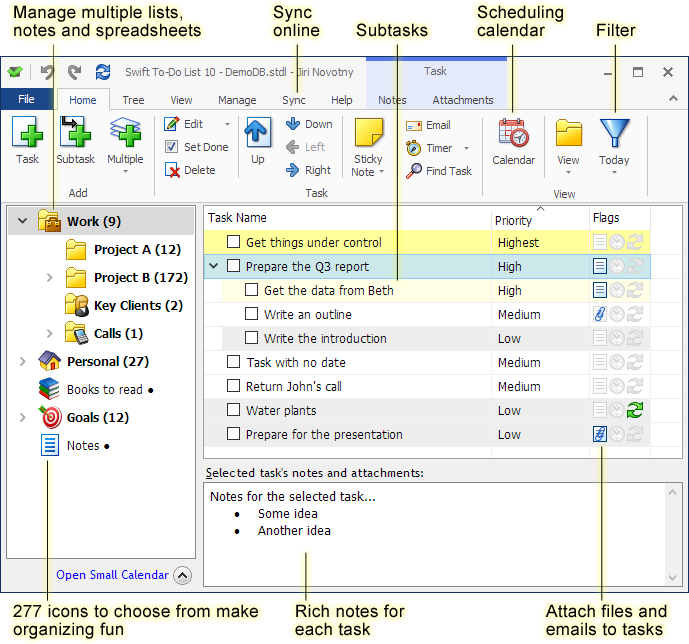
Stop things from getting out of control before you won't be able to handle your job anymore.
Stop things from falling through the cracks and losing important information.
You can finally control, manage, track, remember and do it all.
Don't spend more time managing your tasks than doing them
Swift To-Do List is powerful, but still super-easy and fast to use. It will never get in your way or waste your time.
- Have a complete control over all your information organized in an unlimited hierarchical tree and a scheduling calendar
- Manage all kinds of tasks and notes, lists, goals, projects, reminders, information, files
- Enjoy all the features you might ever need, including unique features such as creating tasks from emails (you can just Drag and Drop emails into Swift To-Do List!)
- Customize Swift To-Do List so it meets your individual needs perfectly.
- Use task management methodologies such as Getting Things Done (GTD), or Swift Mind Freedom
- Excellent support, over 1 million downloads and happy customers in 149 countries.
- Use Secure Sync, backup your data in the cloud, work in a team, access your tasks using a web-app, use iPhone and Android mobile apps.
How to get organized in 5 minutes
Get started immediately, one easy step at a time
You can get your current tasks organized in less than 5 minutes, and experience immediate relief and immediately regain a sense of control.
All you have to do is:
- Click the Download button below, and enter your first name and email address
- This will get you started on our Get Organized Step-By-Step email course.
- You will immediately receive an email with the first simple how-to step.
- As soon as you do the first step (it all takes less than 5 minutes!), you will immediately experience relief and regain sense of control.
- For the following 30 days, you will continue to receive easy how-to instructions and simple organizing tips. By following them, one simple step at a time, you will get completely organized and eliminate overwhelm, forgetting and stress.
Starting is completely risk-free for you. Swift To-Do List comes with fully functional 30-day free trial, and you can export your tasks at any point.
Click the Download button, enter your first name and email address, and get started immediately:
I had mastered it in about 10 minutes. When I started thinking "I wish it could do this" - I soon discovered that it DID do it! Thank you so much - I feel more organized already!
Bruce F, USAThe software blew me away.
LJ Earnest from SimpleProductivityBlogYou designed it in such a way that I was comfortable using it right away. In fact, unlike other PIMs, it has inspired me to be more productive.
Eddie K, UKSwift To-Do List’s functionality, flexibility in options and ease of use is absolutely spectacular. The flexibility of the program in terms of features and its capabilities sure stand out from the crowd.
Swift To-Do List makes for a helluva task organizer: it is flexible, comes with easy to understand options, and offers a myriad of features that can be used comfortably.
Softpedia in-depth reviewSwift To-Do List is simply the best to-do software to be found.
I have tried them all and it has the perfect combination of features and ease of use.
Dr. Chris S, USAGet real results
Swift To-Do List is not another $5 "toy" app. It's a result of almost 11 years of ongoing intensive research and development, and you will get real results with it.
Users of Swift To-Do List report these results on average:
- Feeling of overwhelm reduced by 41.6%
- Forgetting reduced by 56%
- Stress reduced by 33.8%
- Control increased by 178%
With the new free Get Organized Step-By-Step email course, you can likely expect even better results for yourself.
Anyone can do this! All you have to do is to click the Download button, enter your first name and email address, then follow the easy how-to instructions, one simple step at a time:
Getting organized has never been easier and faster.

 Tree Notes
 FastPaste
 Mind Collected


 Swift To-Do List 11
 Swift Mind Freedom
 Meta Productivity
 Daily To-Do List
