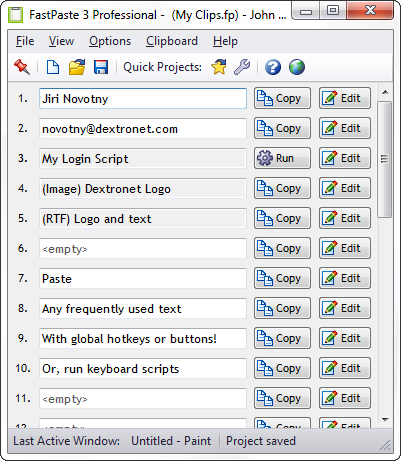
The FastPaste clipboard utility has a lot of features, to save you a lot of time. It has an arsenal of weapons to help you win the war on stupid typing!
FastPaste is very easy to use, and has simple and elegant design. But it still gives you the flexibility and customization options that you need, so you can configure it to meet your pesronal needs.
It is suitable both for personal and business use. There are also some "hidden" features, like great and fast technical support for free, frequent updates, or unconditional 90-day money back guarantee.
Some of the most notable features include:
 |
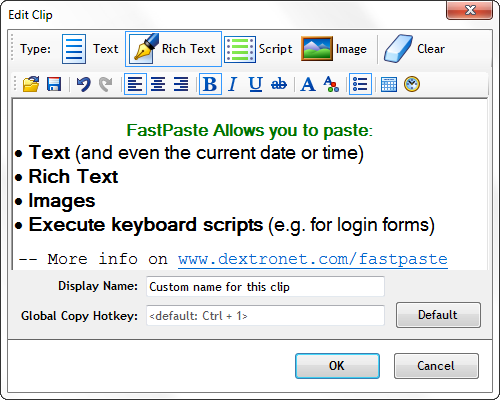
- Paste Plain text, Rich text, Images and Scripts. . You can paste just about anything, from a single word to multi-line rich formatted text.
|
 |
- Scripts allow you to fill forms, send hotkeys and key sequences, and do all sorts of other useful keyboard operations. Be creative and liberal when using scripts. It's your time you are saving here - the most precious commodity in the whole universe! Scripts are in Professional edition only.
|
 |
- Encrypt your projects to protect password and other personal or sensitive data. The encryption uses very secure 256-bit AES algorithm.
|
 |
- Docking (sidebar) support. Dock FastPaste as a sidebar, and have instant access to your commonly used clips.
|
 |
- Portable.. Runs from USB thumb-drive. You can deploy FastPaste to a USB drive and then run it from any computer.
|
 |
- Rich-text clips with full-featured formatting, including styles (bold, italic, underline, strike through), colors, bullets, fonts, and more.
|
 |
- 4 different pasting methods for maximum flexibility:
- Paste using a global hotkey associated to each clip (keyboard)
- Paste using a global paste menu for all clips (keyboard)
- Paste using "Copy" button from the main program interface (mouse)
- Paste using the FastPaste notification area icon right-click menu (mouse)
- All global hotkeys and shortcuts are fully customizable.
- Smart hotkey handling. FastPaste will detect conflicted hotkeys and inform you. It will also register only hotkeys for the clips that are actually used.
- You can also just copy the clips to clipboard, the autopaste can be disabled.
|
 |
- Unlimited number of projects, 30 clips per projects.
- Up to 300 clips readily accessible with keyboard or buttons with Quick Projects feature.
|
 |
- 10 FastProjects for quick access. You can have up to 10 projects associated with global hotkeys and also easily openable from the main toolbar. This way, you can access over 300 clips entirely using your keyboard.
|
 |
- Reorder clips using drag & drop. It couldn't be simpler. Just start the drag on the number upon the clip.
|
 |
- Display clips in 1, 2 or 3 columns, so the FastPaste window will fit perfectly into your work space.
|
 |
- Overview of clips and hotkeys can be exported to HTML or printed. This is very useful, e.g. if you've just setup a bunch of hotkeys and want to remember them, then simply print the overview and stick it on the wall beside your computer for a reference. You will memorize the hotkeys in no time. Or better yet, you don't have to remember anything with this handy overview!
|
 |
- Always on top mode supported.
|
 |
- Easy fast installation that doesn't require admin privileges.
You can install FastPaste even if your Windows user account doesn't have administrator privileges. This makes it perfect for installing it at your day job - you don't need to ask anyone for a permission. Just install it under your user account even without the admin rights.
- Or, install it at home, deploy it to USB thumb-drive using File - Deploy to USB, and run it from there.
|
 |
- And much, much more! This list of features is not by any means complete. Download the free 30-day trial today for the
full FastPaste experience.
- With FastPaste, you will win the war on stupid typing, reclaim lost time, and have more time for creativity, learning, your family and friends, relaxation, and your true interests.
|
Download free 30-day trial
Download the fully functional 30-day trial now and see for yourself how FastPaste can make your life better and save you precious time.

 Tree Notes
 FastPaste
 Mind Collected


 Swift To-Do List 11
 Swift Mind Freedom
 Meta Productivity
 Daily To-Do List