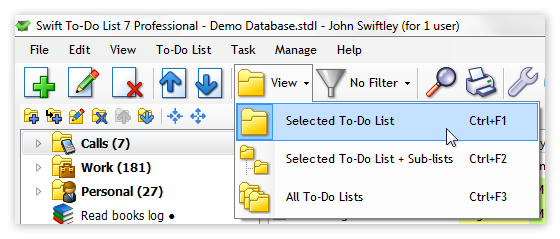
View modes
Swift To-Do List allows you to have a complete overview of your tasks. You can easily view only specific tasks, or all your tasks at once.
You can switch between 3 different View modes:
- Selected To-Do List
- Selected To-Do List + Sub-Lists
- All To-Do Lists
The default view mode is
"Selected To-Do List". This means that only tasks which are in the to-do list that is currently selected in the
tree are shown. When you select a different to-do list in the tree, tasks in that to-do list will be displayed.
But, for example, if you want to view all tasks from all to-do lists, you can simply switch the view mode to "All To-Do Lists". It's just two clicks!
Filters
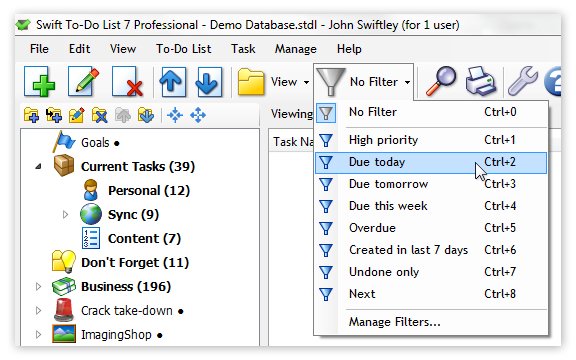
Swift To-Do List has very flexible filtering options. Filtering allows you to display only tasks that you want to see, based on their properties, and hide all the rest.
Editing and creating filters
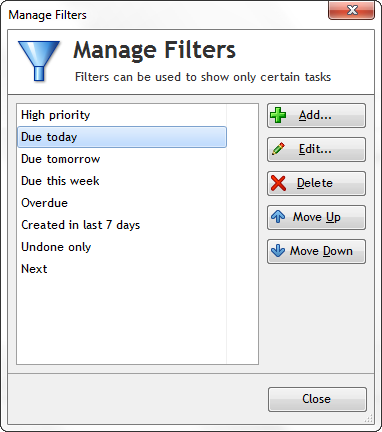
Unlike with view modes, you can create your own filters, or edit the default filters.
This is how the Manage Filters window looks. It allows you to create ande edit filters:
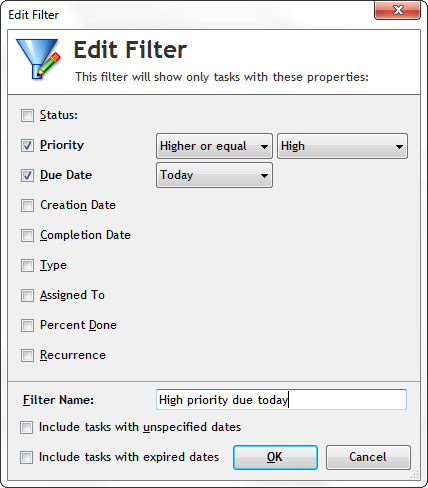
The Edit Filter window is shown below. You select all the fields that you want to filter tasks by, and then specify parameters of the filtering. This window shows only the fields that you use - so, for example, if you do not use the "Context" field for your tasks, "Context" will not be shown in the Edit Filter window to keep the program simple.
Calendar panel for filtering
Swift To-Do List also has a calendar panel which you can use to quickly view tasks for specified dates.
Download Swift To-Do List now
Download fully functional 30-day trial of Swift To-Do List and see for yourself how it can improve your life and work.
I've only recently started using the Swift To-Do List and have been really enjoying it. The simplicity of finding and sorting tasks is fantastic!
Thank you for producing such a fantastic package.
Greg M, USA
 Tree Notes
 FastPaste
 Mind Collected


 Swift To-Do List 11
 Swift Mind Freedom
 Meta Productivity
 Daily To-Do List