Upgrading help
- Can I upgrade from Standard edition to Professional edition?
- Can I upgrade from Professional edition to Ultimate edition?
- If I upgrade from trial to full verison, will I lose my tasks?
- What's new in Swift To-Do List 7?
- How do I upgrade to the latest version? Do I have to uninstall the old one?
- I don't have/use version 6 anymore. Can I still upgrade to version 7?
- I don't know my previous registration info anymore. Can I still upgrade?
- Can I import my tasks and settings into the new version?
- Will I lose my tasks if I upgrade?
- Will I have to pay for upgrades in the future?
- Why should I upgrade from Swift To-Do List 6? I'm happy with the old version.
- Can I still download the old Swift To-Do List 6?
Can I upgrade from Standard edition to Professional edition?
- Yes, absolutely. The upgrade is easy and quick, all your data and settings will be fully preserved and it is nearly instant! All you have to do is to purchase the upgrade to the Professional edition, and enter the new license code that you will immediately receive into the Swift To-Do List 7 Standard, which will instantly fully unlock all the Professional features and turn it into the Professional edition.
- This applies only if you have already purchased Swift To-Do List 7 Standard. If you have purchased only Swift To-Do List 6, you must upgrade to Swift To-Do List 7 first.
Can I upgrade from Professional edition to Ultimate edition?
- Yes, absolutely. The upgrade is easy and quick, you won't lose any data and it is nearly instant! All you have to do is to purchase the upgrade to the Ultimate edition, and enter the new license code that you will immediately receive into your Swift To-Do List 7 Professional, which will instantly fully unlock all the features and turn it into the Ultimate edition.
- This applies only if you have already purchased Swift To-Do List 7 Professional. If you have not purchased it yet, you can get it from our secure online store.
If I upgrade from trial to full verison, will I lose my tasks?
- No, of course not! All your data and settings will be fully preserved.
- Once you purchase the full version, you will receive a License Code. All you have to do is to enter the License Code into the trial version to turn it into a full version. It's simple as that! You even don't need to reinstall the program or download anything.
What's new in Swift To-Do List 7?
- The new version includes more than 100 new features, and enormous amounts of improvements. See What's New on Swift To-Do List product page for more.
How do I upgrade to the latest version? Do I have to uninstall the old one?
- All you have to do is to fully exit Swift To-Do List (using File - Exit) and download and install the new version.
- If you are making a major upgrade to Swift To-Do List 7 from Swift To-Do List 6, then we recommend uninstalling Swift To-Do List 6 first. However, if you are doing just a minor upgrade (eg. v7.0 -> v7.1), you should not uninstall the old version. Then, purchase Swift To-Do List 7 if you have not purchased it yet.
- Please note: Swift To-Do List 7 is a paid upgrade for users of Swift To-Do List 6. If you have purchased Swift To-Do List 6 or older version, you can purchase the upgrade to the latest version with a discount. You will also get all the future minor upgrades for free.
I don't have/use version 6 anymore. Can I still upgrade to version 7?
Yes, you can still upgrade! You don't need to have the old version installed.
I don't know my previous registration info anymore. Can I still upgrade?
Yes, even if you lost it, you can still upgrade to version 7. You don't need to qualify yourself. We will automatically check our records for your previous orders.
Can I import my tasks and settings into the new version?
Yes! In fact, everything will be imported automatically.
Will I lose my tasks if I upgrade?
No, all your tasks and settings will be preserved, and automagically imported into the new version! :-)
Will I have to pay for upgrades in the future?
Once you purchase version 7, you will get all 7.xx upgrades for free. We've been adding new features into the 7.xx version for 1 and half years now, all for free to our existing customers! These were some seriously big improvements that we could easily charge for. And we will be releasing even more free upgrades. We are not going to leave version 7 anytime soon, so you can feel good about purchasing the version 7 now.
Why should I upgrade from Swift To-Do List 6? I'm happy with the old version.
Keep in mind that we won't be able to support the old version anymore. It has many known issues that are fixed in the new version.
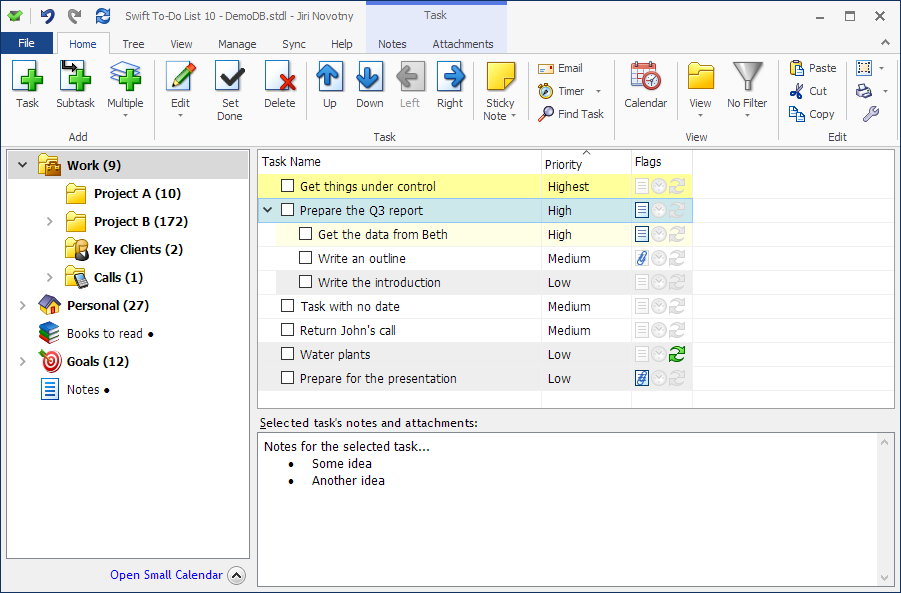
But most importantly, the new version looks better, and has over 100+ new, useful features. The new version is not more complex - it can be even made simpler than the old version, as it is very customizable and flexible.
Just the new colorful collection of 144 icons in 4 sizes or task recurrence or embedded attachments are worth the upgrade alone!
See what's new.
But most importantly, the new version looks better, and has over 100+ new, useful features. The new version is not more complex - it can be even made simpler than the old version, as it is very customizable and flexible.
Just the new colorful collection of 144 icons in 4 sizes or task recurrence or embedded attachments are worth the upgrade alone!
See what's new.
Can I still download the old Swift To-Do List 6?
- The latest and fully supported version of Swift To-Do List is version 7. It has more than 100 new features, numerous improvements, and also many fixes. The new Swift To-Do List 7 replaces Swift To-Do List 6.
- We are no longer able to provide full support for for version 6 (although we will still answer any support requests and emails regarding it for some time). Please download Swift To-Do List 7 instead.
- We strongly recommend you to upgrade to Swift To-Do List 7, for many reasons. Not only it has much more features, better and more attractive design, but it is also much more reliable, stable and secure. Buy the upgrade here, or, if you are a new customer, buy Swift To-Do List 7 here. All orders are backed by unconditional 90-day money back guarantee.
- Please see the list of new features in version 7. The new features include:
- Better and more attractive design
- 144 new to-do list icons in 4 sizes
- New clipboard support (copy & paste tasks and to-do lists)
- Undo/redo support
- Task archive for deleted tasks (with ability to recover deleted tasks)
- Ability to create task-independent notes in the tree
- Better drag & drop support
- Customizable priorities
- More fields (over 20 supported columns in total)
- Full support for recurring tasks
- Improved reminders
- Improved filtering
- Improved notes
- Unicode support
- Ability to insert images into notes
- Improved attachments
- Secure database encryption
- New and improved print/export
- New Email Task feature
- AND MUCH, MUCH MORE! This is just a glimpse!
- The new version is not more complex, in fact, in many ways, it is easier to use and simpler than the old version 6. Also, all your tasks and settings are imported automatically into the new version.
- If you've purchased Swift To-Do List 6 or older in the past, you are eligible for a discount: purchase an upgrade to Swift To-Do List 7 now with a discount. (This is a time limited offer)
- If you still want to download Swift To-Do List 6, you can use this link to download it: http://www.dextronet.com/old_swifttodolist_6.exe (please remember that we will completely stop supporting it in the future). We strongly recommend you to download Swift To-Do List 7 instead.