Free To Do List Software - Freeware!
Are you looking for easy to use yet powerful task list manager that is also free? Then you've come to the right place!
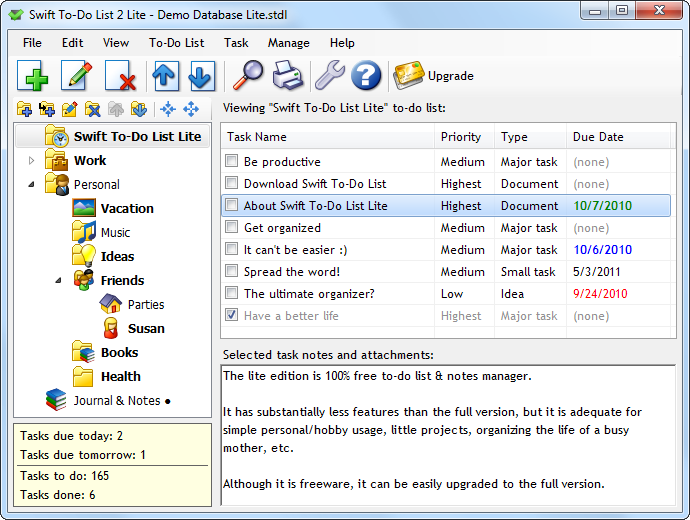
Swift To-Do List Lite allows you to organize all your tasks and notes. It has reminders, allows you to set priorities and organize your to-do lists in a tree structure with icons.
And above all - it is super easy to use! Getting organized has never been easier.
Just before you download the free version...
Why don't you download our full-featured Swift To-Do List 8 instead? It comes with fully functional
30-day trial and it is light years ahead of the free Lite version.
If you won't be thrilled with the free 30-day trial of the full version, you can always switch to the Lite version later without losing any data or settings.
If the full-featured edition could increase your productivity by just 10%, and reduce your stress by 10%, how much would be that worth to you? With the full Swift To-Do List 8, you can finally eliminate forgetting, stress, overwhelm, procrastination; and you can also boost your efficiency, productivity, and become more reliable, significant and successful.
To-Do List Program for basic task management
Swift To-Do List Lite is not just easy to use and free, but it also has all the basic features you might need for simple task management. It has been designed for total clarity, ease of use and simplicity. You can get organized in no time. It makes organizing as simple as possible.
In fact, it's so intuitive that you don' need to learn anything!
The program's interface is attractive and very easy to navigate. Swift To-Do List Lite is a simple but capable utility that can help you stay on top of the things you need to get done.
CNet Review
The features of this free todo app include:
- It's super easy to use
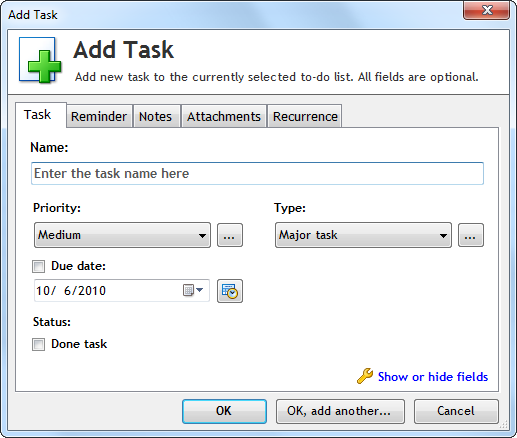
- Set name, priority, task type, due date for your tasks
- Reminders with snooze support
- Write notes for each of your tasks
- Find tasks
- Move tasks to different to-do lists using mouse (drag & drop)
- Reorder to-do lists using mouse (drag & drop)
- Organize to-do lists in a tree with icons
- Choose from 44 different icons for your to-do lists
- Color tasks by their priority
- Print your tasks or export them to HTML or CSV (Excel)
- Sort your tasks
- Can be minimized to system tray (notification area)
- System-wide hotkey for activating or adding tasks
- Info panel with task statistics (how many to do total, today, tomorrow, etc)
- Create tasks from emails - just Drag and Drop them into Swift To-Do List (video demo)
- Can be set to be always on top
- Done tasks are automatically placed at the bottom
- Batch edit tasks
- Manage both tasks AND notes
- Manage not just to-do lists, but also general lists
- Can handle up to 200 tasks and 30 to-do lists (Swift To-Do List 8 can handle unlimited number of tasks and to-do lists)
As you can see, it has all the basic features you might need. Simply create to-do lists in a tree, choose their names and pick their icons, and then fill them with tasks.
You can then write notes for each of your tasks - or not, that's up to you!
Set Priority, Due Date and task type for your tasks. (You can edit the list of task types.) All these task properties are optional. However, if you use them, you can sort your task list using them.
You can easily activate reminder for any of your tasks. Simply select date and time and you are done. The reminder window will be shown at the chosen time and it will play a sound to get your attention.
Then, you can print your lists or notes to take them with you.
You can use it both as a personal organizer, or simple project task list management tool. It is flexible and light-weight.
5 reasons to use our free todo list software
- Never forget anything again
- Increase your productivity and be finally organized
- No more stress, sleep better at night
- Be more efficient and productive
- Create the success that you want in your life
But wait! Need a full-featured task list manager?
We also offer a truly professional tool that can help you as an individual tremendously. It is still super easy to use, but it has much more features that make a real difference (compared to the free version). If you plan to use our software for your work and not just for hobby projects, then we strongly recommend you to download our Swift To-Do List 8 instead. There are too many great extra features to list them here - look at the features page of the full version instead.
We've been working hard on Swift To-Do List for over 8 years now, and we can now proudly say that it is the number one to-do list software for Windows! But do not take just our word for it - this is confirmed daily by the many enthusiastic testimonials that we receive from our happy customers. Just see what others think about Swift To-Do List 8:
I LOVE this software - it is EXACTLY what I have been looking for for so long!! THANKS!!
Gabrielle F, USADo you know, I've been looking for To Do software like yours for almost 15 years? Intuitive, practical, interactive. Who would have thought it would take so long to find! In fact, it makes me happy to use it. How's that for practical?! Thank you!
Darryl B. USAVery very close to perfect! This is one of the few programs that's WORTH the money.
Dale S., USAThe Swift To-Do List is exceptionally well thought out. It is certainly the finest ToDo, Task, Goal, Project Management tool around. Congratulations on your programming skills, your country seems to be the home of many programming geniuses.
Personal development expert Chuck Gallozzi, CanadaSwift To-Do List is simply the best to-do software to be found. I have tried them all and it has the perfect combination of features and ease of use. The best part is being able to customize my lists by dragging and dropping, as well as by manual adjustment. I love it!
Dr. Chris S.I just want to tell you that, quite honestly, Swift To-Do List is one of the most pleasant surprises I've run across in years. I am a veteran computer user and since the days of MS-DOS, I've used some of the very best Personal Information Manager (PIM) including ECCO Professional, Lotus Organizer, InfoSelect, several generations of Outlook, Chandler, Remember the Milk, GQueues, and Agenda At Once.
In my honest opinion, none of them compares to Swift To-Do List (STDL).
Why? Because while STDL and most of the PIMs I've used have the same basic features, STDL beats them all in terms of being "just right" to the point of being fun to use. With most PIMs, you go through a learning curve in which you must conform to someone else's idea of what to-do list is. In the case STDL, you designed it in such a way that I was comfortable using it right away. In fact, unlike other PIMs, it has inspired me to be more productive. That's important because I run several businesses.
Every feature and design attribute is thought out so precisely -- with so much care and intelligence. Thank you once again Jiri for making every day more productive and fun!
Eddie K, UKAlthough you can upgrade from the primitive Lite version to our full-featured Swift To-Do List 8 anytime, why not download it straight away and take advantage of the fully functional free 30-day trial? It is is light years ahead not just of the Lite version, but also of its competition. Download it right now and experience it fully.
And hey, if you won't absolutely love the full version, then just download the free Lite version after your free 30-day trial expires. You won't lose any data or settings.
If you want to reach your full potential and be more successful, get started with the full version now:
- By Jiri Novotny, Dextronet co-founder

 Tree Notes
 FastPaste
 Mind Collected


 Swift To-Do List 11
 Swift Mind Freedom
 Meta Productivity
 Daily To-Do List