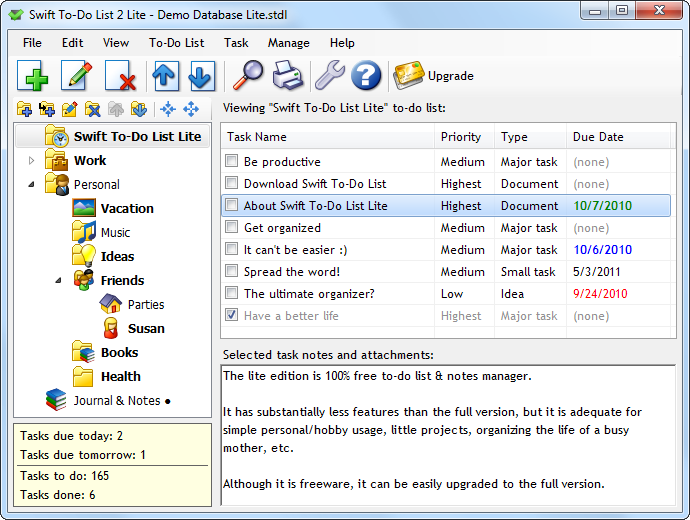
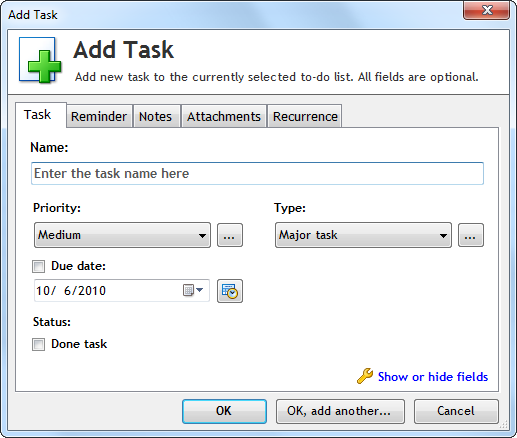
Swift To-Do List Lite is a free but limited version of the full Swift To-Do List 8, which comes in 3 editions: Home, Professional and Ultimate. All 3 editions of the full version have many more features than the free Lite version.
Upgrading to full version
You can easily upgrade to the full version. Simply download and install the free fully functional 30-day trial of the full version. That's all!
All your tasks and settings will be imported automatically, and you can always go back to the Lite version if you decide not to purchase the full version after the 30-day trial ends.
Lite vs. Full
The features available only in the full version include:
- Subtasks to break down complex tasks into small steps, and manage projects (Pro only)
- Automatic archiving of done tasks, e.g. after a few days (Pro only)
- Hide Until field to hide tasks for later (Pro only)
- Column renaming for total customization (Ultimate only)
- Numbered to-do lists (Ultimate only)
- Calendar Panel for instant overview of important deadlines or meetings (Pro only)
- Ability to show/hide columns as needed (Pro only)
- Task recurrence
- Archive for deleted tasks (you can restore tasks)
- Filtering
- View modes (view all tasks at once, tree branch, etc)
- Task attachments (embedded attachments supported)
- Attach emails to tasks (from Outlook etc)
- Full and customizable print and export
- Ability to print or export a single task or task selection
- 144 or 244 (in Ultimate) different colorful tree icons
- Database encryption
- Customize types, statuses, contexts, etc.
- Color tasks by priority, type, or other fields
- Rich notes formatting, including bold, italic, underline, bullets, numbered lists, images, and more
- Ability to email tasks (Pro only)
- Time tracking
- Email reminders and recurrence notifications (Pro only)
- Extra columns that you can optionally use include: Start Date, Completion Date, Status, Percent Done, Assigned To, Context, Time Estimate, Time Spent, Time Left, Creation Date, Change Date, Reminder, Recurrence, Notes Preview (Pro only)
- Multi-level numbered lists in notes (outlines) (Ultimate only)
- Spellchecker for notes (Ultimate only)
- Two-line displaying of tasks with too long task names (Ultimate only)
- See the Features page of Swift To-Do List 8 for more information.
Download free 30-day trial of the full version
Why not try the full version right now? You have nothing to lose, and much to gain. When you are in the free 30-day trial period, the Professional edition is trialed by default. You can change this using the menu Help - Trial Edition
You can purchase the full version from our secure online store. All orders are covered by our unconditional 90-day money back guarantee.
What our customers say
After buying various to-do type programs over the years (MindManager, TreePad X, Maple Professional, Goalscape, Quick To-Do Pro, Task Merlin Pro, MS One Note...), I've finally settled on Swift To-Do List Professional.
Martin K, UKI was looking for a tool to get rid of my paper notes and to be able to prioritize all my small tasks and make sure that nothing was missed on a specific date. I did find a couple of different packages but all of them were either too complex to start using or too comprehensive and inflexible for my purpose.
I downloaded the free Lite version of Swift To-Do List and started using it right away. It was soon obvious that it did the job quite well. It has the features I need and it is very easy to use. Now I use the Professional version and I am still very focused on keeping it all simple and avoid 'non-sense' information.
Rene Lynge, Managing Director, DenmarkJust want to say, that the program is very useful our day to day business, we have upgraded to the full version and find it extremely useful.
Bridget W, UK
Read
more testimonials.
Decided yet? Purchase the number one to-do list software!
Your purchase is completely risk-free, as it is protected by our unconditional 90-day money back guarantee. Simply put, if you are not amazingly happy, we don't want your money.
Our secure online store uses strong 128-bit SSL encryption. Our e-commerce partner is BMT Micro, based in USA, North Carolina, operating since 1997.
You will receive the full version immediately after the simple payment. We accept many different payment methods, including all major credit and debit cards, PayPal, Google Wallet, Amazon Payments, mail/fax orders, wire transfers in Euros, and more.

 Tree Notes
 FastPaste
 Mind Collected


 Swift To-Do List 11
 Swift Mind Freedom
 Meta Productivity
 Daily To-Do List