Daily task list organizer
- Day-by-day organized to-do lists
- Rich text notes for each task
- Attach files, links and emails to tasks
- Reminders
- Recurring tasks
- Custom color your tasks by their type
- Print and export your tasks
- Minimize to notification area, global activation hotkey
- Drag & drop tasks around to change their order
- Automatically transfer unfinished tasks to next day
- ... and more!
 Looking for something more powerful? Check out our Swift To-Do List instead.
 Daily To-Do List is a simplified version of Swift To-Do List, which is our best and most popular product.
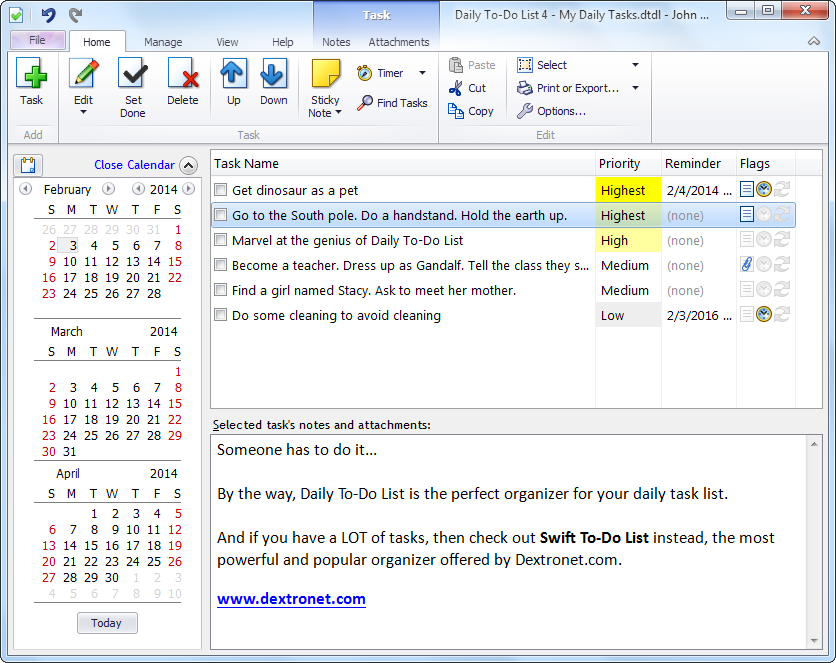
Calendar to-do lists - a to-do list for each day
Daily To-Do list is a simple to-do list software with reminders and to-do lists organized day by day.
You navigate the to-do lists using a calendar panel on the left side. Daily To-Do List keeps a separate list for every day, and automatically transfers unfinished tasks from yesterday to today's list. You can also easily view multiple dates at once.
You can print your tasks, or export them to HTML or CSV.
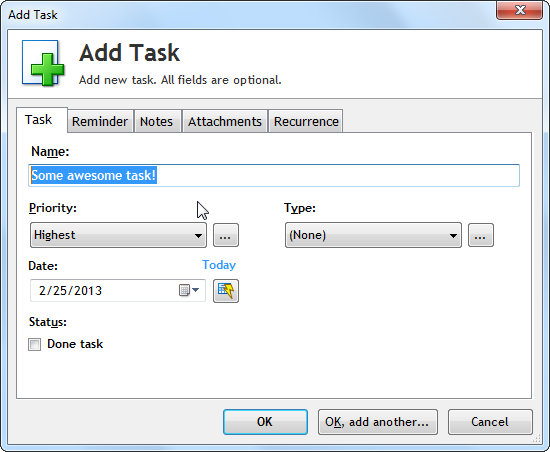
All tasks can have customized priority, type, reminder, rich notes, attachments, and more.
Tasks are ordered, and you can move them up or down using toolbar buttons or just Drag & Drop them around using mouse.
You can color the tasks by their Type or Priority, so you can easily recognize the type of individual tasks. Priority is expressed by small icon upon task.
I have been looking for many years for a to-do list program to replace my simple pad of paper. I have tried many and they were all overly complex for my needs. Daily To-Do List is just right.
Bob H, USALove the Daily To-Do List program! Thanks for the great program - you’ve made my life a lot easier!
Vern K, USAThe program window is composed of 3 main parts: calendar panel, to-do list view, and notes panel. The calendar panel helps you navigate between the lists for each day. To-do list panel displays tasks for the selected date(s). The notes panel displays notes for currently selected task.
Daily To-Do List supports rich-text notes. You can insert links, images, change fonts and colors, make bullet lists, etc.
You can also attach files to your tasks. You can either add the attached files either as shortcuts, or embed them directly into the database.
Very useful feature is the ability to Drag and Drop emails into Daily To-Do List to instantly create tasks from them. All major email clients are supported, including Outlook, Mozilla Thunderbird, Lotus Notes, Windows Live Mail, and others.
I LOVE Daily To-Do LIst. It is great.
Gary A., USA It is the best "to do" program I have tried. It's easy to use without being too simplistic, and met the needs I was looking for in a program.
Thank you, for such a program.
Donna L., USA I must say that I cannot dispense Daily To-Do List anymore for my daily routine. It's just so simple to use and "straight to the point". It does everything a task
manager should do without making things too complicated, and it doesn't make me lose time with features that I would never use and extras that don't accomplish anything.
Congratulations.
Pedro S., PortugalNever forget anything again with the inbuilt reminder, which can be easily activated for any of your tasks. When you are reminded, the program will make a sound, display a on-top window, and you can choose from several options, like to remind you again in a few minutes (snooze), or mark the task as done.
Everything is saved automatically. Global hotkey is another handy feature, just press it and the Daily To-Do list will be restored from the system tray and ready to use.
Daily To-Do List also supports recurring tasks - daily, weekly, monthly, yearly, with a lot of options and flexibility.
You can deploy the program on USB and carry it with you. You can also place the database file into a Dropbox folder and access it from anywhere.
But most importantly, Daily To-Do List is very easy and fun to use. You can get started with it immediately - download it now and be up and running in just 3 minutes!
Get organized and never forget anything again!

 Tree Notes
 FastPaste
 Mind Collected


 Swift Mind Freedom
 Meta Productivity
 Daily To-Do List