

What I learned during our Micro-ISV startup journey – Dextronet Micro-ISV Insights Blog

What I learned during our Micro-ISV startup journey
A blog for mISVs, startup maniacs, and everyone in the software business.

Appillionaires

Appilionaires
I’ve been reading a lot more since getting Kindle. It’s no wonder – Kindle is extremely convenient, and I can buy and start reading any book literally in less than 60 seconds, even when there is no Wi-Fi (Kindle comes with free 3G internet access). To this day, this is still mind-blowing to me. I used to wait for 3-4 weeks for books to arrive to Czech Republic from Amazon in the past.

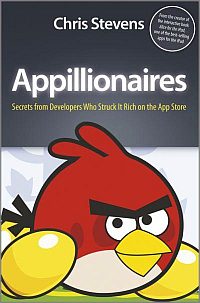
As a software author, the little book called “Appillionaires” written by Chris Stevens has caught my attention and found its way to my Kindle. Just as Kindle revolutionized the book industry, the Apple App Store has revolutionized the mobile applications industry. Let me share with you what I learned in the book.

Appillionaires – How it all started

The story starts with the iPhone. Without iPhone, App Store simply wouldn’t be possible. Before iPhone, the carriers had strict control over the design and functionality of cell phones. Cell phone manufacturers had to stick to hundreds of pages of specifications; otherwise carriers wouldn’t distribute and subsidize their phones. Apple’s first attempt at smart phone was called Motorola ROKR. Because Motorola and the industry were tied by the old ways, the phone was a failure. Steve Jobs has realized that Apple will have to build the iPhone entirely on its own. And it did – in complete secrecy. iPhone entered the market thanks to a unique deal with AT&T, which allowed Apple to have complete control over the software and hardware of iPhone, which was unheard of at the time.

iPhone originally came only with inbuilt apps, and it was not possible to download additional apps (unless you “jailbreaked” the phone). Apple realized the opportunity, and launched the App Store, which became instant success. Apple leveraged the payment information it already had for millions of iTunes users. For them, purchasing from the App Store was ridiculously easy.

The gold rush

The astonishing success of the App Store has started a gold rush. Everyone wanted to play the App Store lottery. After all, the successful apps started earning many millions of dollars! But still, it was a lottery, because the luck factor was, and is to this day, a big factor when it comes to success on App Store.

Media has popularized the first successful apps that made their authors appillionaires. Today it’s virtually impossible not to see any Angry Birds reference in any given week.

The media popularization of the App Store success stories skewed the public opinion about the app store market – it might seem that attaining riches there is easy, but the reality is that it is a very tough market.

Some interesting facts

Did you know that…?

  • There are over 530.000 apps in the App Store
  • Over 20.000 news apps are submitted each month
  • It takes about 5 days on average for App Store to approve a submitted app
  • Over $250 million dollars is spent on App Store every month
  • The average app price is $1 for games and $2 for other apps (But there are also thousands of apps priced at $9.99, $14.99, $19.99 or more)
  • The most popular app categories are games, books and entertainment
  • The total cost to buy all apps is over one million USD. Tough for collectors!
  • Apple keeps complete editorial control over the App Store content
  • The entry barrier is relatively low – you just need to pay the $99 sign-up fee and adhere to Apple’s guidelines
  • Apple takes a 30% cut, but you can set any price you want

About the “Appillionaires” book

The book is very well structured. It has three parts, each of which has several chapters. Every chapter has a bulleted summary at the end. The three parts are:

  1. The Birth of the App – the history of the App Store and iPhone
  2. The Appillionaires – covering personal stories of the most successful App Store authors
  3. The App Revolution – talking about the current trends happening in the app business. Large game companies and publishers desperately want to jump on the bandwagon by acquiring app developers left and right.

The Appillionaires stories cover the developers of:

  • Doodle Jump
  • Harbor Master
  • Pocket God
  • StickWars
  • Angry Birds

Incidentally, all of these are games.

The stories are very intriguing – for example, it has surprised me that the Angry Birds authors released 52 games before Angry Birds and were on a verge of a bankruptcy. I was also surprised to learn that Angry Birds earn more from merchandise and licensing deals than the actual app sales (which are in tens of millions of dollars).

Yet another interesting tidbit is that the commercial success is much harder on the Android platform than on the Apple platforms: Sales of Angry Birds on the Android platform were very disappointing – you can now get Angry Birds for free for the Android. The Android version makes money exclusively from advertising – and it is significant revenue.

The unique background of the interviewed authors of these apps – almost always 1 or 2 person teams – has given their games a unique twist that was probably the secret ingredient necessary in order to succeed in the app store.

I disliked only two things about this book: First, there are no stories of successful non-game app authors, which would certainly provide additional perspective and insight useful to mISV like me.

Second, the book omits to explicitly say just how “cold” the hard cold reality is. So let me give you an idea – because it costs about $10.000 to $50.000 to develop an average iPhone app, most of apps never even cover the original expenses. 30% of apps never make more than $1000 in total and majority of apps earn less than $700 per year. The reality is even grimmer on the Android platform – iOS developers make twice as money as Android developers. And the competition is fierce – together, the Apple App Store and Android Market list over 700 thousand app.

That being said, the book is well written and certainly an enjoyable and worthwhile read. Both paperback and Kindle versions are available from Amazon. It has 224 pages, which is just about right. The most valuable part of the book are the detailed stories. The stories of the app developers from their youth might even stir some nostalgia in you. And who doesn’t like to read about the success of fellow developers? We all are “rooting for the little guy”.

- By Jiri Novotny, the founder of Dextronet.com and author of Swift To-Do List, a successful task management software for Windows.

Additional Resources

Related Posts:

stdl

Swift To-Do List 7

The ultimate to-do list and notes software for Windows.

Better ListView

Better ListView

Ultimate .NET ListView replacement control
for WinForms (C#, VB.NET)

Are you a Zen Coder or Distraction-Junkie?

I just posted a new must-read guest article “Are you a Zen Coder or Distraction-Junkie?” on Component Owl blog.

It’s not just about coders or programmers; and it’s not just about productivity and time management. It summarizes a lot of things I’ve learned by trial-and-error in my career.

What you do when compiling can ruin your life. And not just when compiling.

Go read it now – “Are you a Zen Coder or Distraction-Junkie?” – There are pictures! ;-)

Related Posts:

Better ListView

Better ListView

Ultimate .NET ListView replacement control
for WinForms (C#, VB.NET)

30 books everyone in software business should read (and why)

I have personally read every book in this list. The enormous value I’ve gotten out of these books is the sole reason I am recommending them. These books helped me to make my Swift To-Do List very successful. There are no affiliate links in this post. If you have suggestions for other books that would benefit people in software business, please post them in comments, and I will update the additional list at the end.

There are both new and old books in this list. For the naysayers: Don’t forget how easy it is to succumb to hype and to phrases like “anything older than 3 months is irrelevant”, “it’s the age of the app”, “desktop is dead”, and so on. That’s simply not true. Reading these books can be very beneficial for you and for your business. The concepts are still valid, the ideas can be still utilized. Even if the world has fatalistically moved on (and it hasn’t), you can’t catch it up without a strong foundation. Many things are cyclical or ageless. You can re-combine ideas, find patterns, get inspired and most importantly, learn new things. These books are a nourishment for your mind. And hey, it can’t hurt to read something different than you are used to read!

The books are ordered randomly; it would be nearly impossible to come with a satisfying ranking. Apples and pears, you know.

Writing this post took me 5 hours (plus 5 years to find and read the books). Enjoy.

  1. Dreaming In Code (Scott Rosenberg) – The definitive lessons about over-ambitiousness and idealism in software. True story about spectacular software failure. Dream team, dream budget, and a undreamed-of failure. Reads like a novel. The subtitle of the book is “Two Dozen Programmers, Three Years, 4,732 Bugs, and One Quest for Transcendent Software”.
  2. Peopleware: Productive Projects and Teams (Tom DeMarco and Timothy Lister) – Are you sure you are not chasing marginal productivity gains while the fundamentals are eluding you? Also, chances are, you are not working alone. If you have not read this yet, then better start whistling and go secretly read it under a blanket with a flash light.
  3. Startups Open Sourced: Stories to inspire and educate (Jared Tame) – Entertaining read. Not immediately actionable, but definitely worthwhile. Even if you have a mature business, the fresh look from the startup perspective can give you some ideas what you might improve upon. Interesting tidbit – reddit founders used to create hundreds of fake user accounts, submissions and comments to get their site started. Kindle edition is listed separately.
  4. GUI Bloopers 2.0 (Jeff Johnson PhD) – If you think your GUI design could use some improvement, read this. It even includes images! ;-) Negative examples are not only useful, but also fun, and they give you warm fuzzy feeling that your GUI is better. Or is it…? Some of the bloopers reminded me of Interface Hall of Shame.
  5. The Elements of Style – You write a lot of text. This will help you write it better. Your code, writing for web, blog, emails – all that is text. (The book is public domain now.)
  6. In Search of Stupidity (Merril R. Chapman) – The subtitle of this book is “Over Twenty Years of High Tech Marketing Disasters”. It’s fun to read because it’s about failures. It will make you feel good, because you are not failing on such a huge scale. But do not be deceived by that false positive feeling – unless you are not failing at least a bit, you are not experimenting enough, which is a failure by itself. Even giants like Google are constantly scraping ambitious projects because they simply didn’t work out.
  7. Do More Faster: TechStars Lessons to Accelerate Your Startup (Brad Feld and David Cohen) – Similar to Startups Open Sourced, basically stories of new startups that were supported by TechStars startup accelerator (which is similar to Paul Graham’s Y-Combinator).
  8. Content Rules (Ann Handley, C.C. Chapman) – A must read. And if you are struggling to grow your businesses to a certain extent, chances are, this book will tell you exactly how to do that.
  9. Code Complete – In case you have not worked in any software company or team, but just on your own, your code will be probably greatly enhanced once you implement the ideas presented in this awesome book. Many developers swear by it; it’s their bible.
  10. Maximum Achievement (Brian Tracy) – There is not much self-help books that I would readily recommend to mISVs. However, Maximum Achievement will help you to live up to your potential, and that has significant impact on your bottom-line.
  11. Founders At Work (Jessica Livingston) – Inspirational and motivational read. Not immediately actionable, but might make you excited again about the fact that you are are in software business.
  12. Blue Ocean Strategy – If you are feeling like innovating, or feel stuck with your current market positioning or product/services portfolio, read this. The subtitle of this book is “How to Create Uncontested Market Space and Make Competition Irrelevant”. It is written by example – lots of cool stories. The stories clearly tell how important is the presentation of your products/services.
  13. Hackers & Painters (Paul Graham) – Really great stuff (that you’ve probably already read). Paul is excellent essayist, and has some refreshing insights. If you don’t know Paul Graham, he is the founder of Y-Combinator. All his essays are also freely available on his website. The book includes only some of them. My favorite essays are How to Make Wealth and Why Nerds are Unpopular.
  14. Joel On Software (Joel Spolsky) – Joel is my hero. Joel is a spectacular pragmatist and software business owner with deep knowledge of Microsoft technologies. This book will bring you loads of ideas to improve your business, and will definitely change your views on many things related to technology, Microsoft, development and software business.
  15. More Joel On Software (Joel Spolsky) – Same as above. Really, you can’t get enough of this stuff.
  16. Best Software Writing (Joel Spolsky) – That’s right, Joel now occupies 10% of these 30 books.
  17. Outliers (Malcom Gladwell) – Ever wondered why is Bill Gates so successful?
  18. Eric Sink On The Business Of Software – This is a classic book from a man who coined the term “Micro-ISV”. Everyone in the TBoS community knows the book. You’ve probably already read it; if not, you can still pick a thing or two out of it.
  19. Words That Sell (Richard Bayan) – If you do your own copywriting, this book will save you hours of work, help you quickly overcome writer’s blocks, and enable you to create texts that you will finally feel proud about. Just don’t overdo it with the buzz words ;-)
  20. The Pragmatic Programmer (Andrew Hunt and David Thomas) – Another classic full of great guidelines and principles related to programming. For example, if it has never occurred to you that it is fairly easy to write code that writes code, and you could probably utilize that in your own projects with great success right now, then this book is a must read for you.
  21. The E-Myth Revisited (Michael E. Gerber) – At first, the principles presented in this book might seem not much applicable to mISVs, but if you switch the word “employee” for “script”, the book gets whole new (and useful) perspective.
  22. The Business Of Software (Michael. A Cusumano) – Another (perhaps outdated) classic. Read it, it’s well worth the time only if to gain some structured thinking about (your) software business.
  23. Anything You Want (Derek Sivers) – Useful for gaining high-level perspective. Reminder that there is more than money in business (and life).
  24. Permission Marketing (Seth Godin) – If your email marketing is underutilized, this book will give you the basics for successfully building relationships with your customers via email.
  25. Ikigai (Sebastian Marshall) – This book presents sharp unique thinking related to many areas of life. It is not directly related to software business, but to personal achievement, individualism, productivity, negotiation, and similar things. Both enlightening and entertaining read. For Kindle only.
  26. Copy Hackers (Joanna Wiebe) – If you write text for web, you are a copywriter. In such case, definitely read these 4 short e-books. Highly actionable advice that can improve the bottom line of your business.
  27. Head First Design Patterns – If you don’t know what is a “design pattern” in the OOP world, don’t think twice before buying this book. Don’t be discouraged by the fact that the samples are in Java, the sample code is easy to understand even if you don’t know a thing about it.
  28. The Art Of Ignoring (Alwin Hoogerdijk) – This is not really book, but a presentation with slides (and an accompanying video), but reading this stuff is simply not optional. And it’s free!
  29. The Dip (Seth Godin) – Not sure if you should abandon one of your products/services, or not abandon them? Subtitle: “A Little Book That Teaches You When to Quit (and When to Stick)”.
  30. Personal Development for Smart People (Steve Pavlina) – This is probably the best book on conscious self growth ever written. The ageless principles described in this book can be actually implemented into your business, which gives this book a whole new perspective.

Books that didn’t made it into the list

These books were a bit disappointing to me, but they might be awesome for you.

Better ListView

Better ListView

Ultimate .NET ListView replacement control
for WinForms (C#, VB.NET)

stdl

Swift To-Do List 7

The ultimate to-do list and notes software for Windows.

Optimizing your installer (setup) for higher conversions

Increase your conversion ratios by improving your software setup. The installer of your software application is an integral part of your product. It is the first thing the user sees, and yet, it is often overlooked. First impressions matter, and more importantly, if installing your software isn’t as easy as possible, you are losing installs, potential customers and revenue.

When it comes to installers, what should you try to improve? The goals are to:

  • Make the installation process as short as possible
  • Make the installation process as easy and simple as possible
  • Make a solid and professional impression
  • Use the opportunity to install shortcuts to the software, as well as links to your website(s), to the proper places

Basically, we are trying to maximize the successful install ratio, make a good impression, and utilize the opportunity to install shortcuts to your product and your website (without annoying the user, obviously!).

You can also use the setup (installer) as a sales tool in some cases. I will write more on that in the future.

Eliminating steps

Modern installers, like the Opera browser installer, have just 1 or 2 step. Chrome installer has zero steps – it asks you whether you want to make Chrome the default browser, and whether you agree to the EULA, before you download the actual setup file! When you run the setup file, no user interaction is required. It just installs and runs Chrome.

Majority of currently used setup creators, including Inno Setup and NSIS, are wizard-based. Unfortunately, most of these packages have far too many unnecessary steps.

For example, the default steps in Inno setup installer are:

  • Welcome
  • License Agreement
  • Select Destination Location
  • Select Start Menu Folder
  • Ready To Install
  • Installing
  • Setup Completed

Making the user to go through 5 pages before the actual installation begins is usually completely unnecessary.

In an ideal world, there could be just one page with big Install button, and pre-checked checkbox “I agree with the EULA”. There should be a link to display the EULA. Optionally, the page can also contain “Advanced…” link/button that will display a small modal dialog that will allow the user to customize the destination folder, and possibly shortcuts. And that’s it! You don’t need anything else.

The installer of the Opera browser is a great example. Check it out at http://www.opera.com/download/ – it has just a single page, and is absolutely beautiful.

So, what you should do is to go through all steps of your installer, and eliminate everything that is not necessary.

Let me give you a couple of examples from Inno setup -

The “License” step of Inno Setup requires the user to click the “I agree” option button, and then click the “Next” button. You can simply remove the option buttons, and change the text of the “Next” button to “I Agree” in this step.

Please note: I am not a lawyer, and I am looking at this purely from the perspective of maximizing the number of successful installs. It is possible that making it “too easy” to accept the EULA can undermine its validity. Do your own research first.

Even the destination folder is sometimes unnecessary, and can be entirely skipped, especially when it comes to simple consumer apps and utilities.

Start Menu folder selection step is completely unnecessary, too.

“Ready To Install” step is useless. Get rid of it.

With a little effort, your refined wizard can be like this:

  • Welcome
  • License Agreement (simplified)
  • Installing
  • Setup Completed

You can even remove the “Welcome” step, but you will probably want to make the “License Agreement” step look pretty, as the Welcome step usually displays some fancy graphics.

Making it easier and simpler

There are many things you can do. All general principles of user friendly design apply to installers as well. Some tips -

  • If possible, don’t require elevated admin privileges in your installer. Many users are not running an admin account. This can be a big problem especially at their workplace, where they need to ask for permission the IT manager or boss. If your setup works even without the elevated privileges, it is a big win – you will most certainly get more installs. For example, Chrome installer doesn’t require elevated privileges and installs into the current user AppData\Local directory (this also allows automatic updates without elevated privileges).
  • Eliminate all unnecessary text and controls. For example, Inno setup displays free disk space on the directory selection page, which is useless for majority of applications, because Windows display warning when the disk space is lower than a few hundred of MBs anyway, and your application is probably much smaller.

When building wizard-based installers:

  • If possible, make the “Next” button large and prominent.
  • Make sure that the “Next” button is selected (has focus) by default. So when someone just runs the installer and presses the spacebar key, he will always proceed to the next step of the installation.
  • In many cases, you will discover that you can simply hide the “Back” button. How likely it is that someone will want to re-read that EULA?

Shortcuts and Internet Shortcuts (.url)

I recommend installing these shortcuts:

  • Application shortcut on the desktop
  • Application shortcut in the Quick Launch toolbar
  • Application shortcut in the Start Menu
  • Company website link in the Start Menu
  • Purchase link in the Start Menu
  • “Contact Us” link in the Start Menu
  • Help file shortcut in the Start Menu

Other ideas include:

  • Online FAQ/knowledge base link in the Start Menu
  • Online forum link in the Start Menu
  • Blog link in the Start Menu
  • Facebook link in the Start Menu
  • Twitter link in the Start Menu

All Start Menu links should be placed in a subfolder named after your application.

Definitely place a shortcut to your application on the user desktop. You don’t even need to ask the user in the installer. You can do the same for Quick Launch toolbar.

Avoid placing generic shortcuts to your website(s) on the desktop – having a shortcut named “Buy” placed on the user’s desktop is a big NO-NO.
All shortcuts created by the installer must be either placed in the proper subfolder of the Start Menu, or, contain the actual name of your software product, e.g. “Buy My Awesome App”, not just “Buy”.

Also, never place a shortcut “More Software from My Company” on the user’s desktop. As a rule of thumb, anything that could be considered an “ad” should be avoided. Feel free to go link-mad in the Start Menu folder of your application, but be careful when placing links to the user desktop.

Making a solid impression

I have three quick tips to offer here:

  • Make sure that your installer is code signed. This is a must. Installer is by far the place where having a signed executable counts the most. You can get a code signing certificate from K Software for superb price, and Mitchell, a fellow mISV vendor, offers great support, too.
  • Include an attractive graphics in the installer. Don’t settle for the default images. Ideally, get it made by a professional designer.
  • Don’t change the default installer icon, or at least make sure that it looks like an actual installation icon. Using the same icon as your application has might seem like a good idea, but the installer icon shouldn’t be confusable with the icon of your actual application.

Conclusion

Simplifying the installation process and making your setup more polished and professional is an area that offers excellent ROI revenue-wise, especially if you have yet not touched your installer a lot.

Easier installation => more installs => more users => more customers. It’s really that simple.

Related Posts:

Better ListView

Better ListView

Ultimate .NET ListView replacement control
for WinForms (C#, VB.NET)

stdl

Swift To-Do List 7

The ultimate to-do list and notes software for Windows.

Interview with Embarcadero about FireMonkey, mISV business and Delphi

This is my recent interview with Embarcadero. While we don’t use Delphi, their technologies are probably the most interesting alternative to Microsoft .NET technologies, and Delphi Prism can be used even inside Visual Studio. Their hot new multi-platform FireMonkey technology is very interesting as well.

I’ll be asking some questions related especially to mISV business, too.

Could you please quickly introduce yourself?

I’m Andreano Lanusse, Technical Lead Evangelist for Embarcadero’s Developer Relations organization. I spend a great deal of my time with developers, both onsite and at conferences and user groups, to ensure the company’s tools meet the expectations of customers. Prior to Embarcadero, I worked at Borland for thirteen years in numerous roles, including support coordinator, engineer and product manager. I also worked as a principal consultant for Borland Consulting Services on the development and management of critical applications. I hold a bachelor degree in business administration from Sumare Institute (Brazil) and an MBA in project management from FGV (Brazil). I’m also certified in Product Management from UC Berkeley, have Borland and Microsoft Certifications, and I am a Scrum Master.

Your new FireMonkey technology allows developers to create multi-platform apps. Do these applications look exactly the same on Windows, Mac and iOS?

It is the choice of the developer and what they are aiming for. FireMonkey is designed to be a rich platform and applications can look fully native on each platform. Or applications can take advantage of FireMonkey’s capabilities to deliver fully custom experiences and the same custom appearance on all platforms.

The exception is platform specific characteristics such as menus, common dialogs, etc – for example Mac menus are part of the desktop whereas Windows menus are part of the app, and iOS does not have menus – in these cases FireMonkey always yields to what’s correct for the particular platform.

FireMonkey applications use the GPU to render user interfaces using FireMonkey’s scalable vector powered “style engine” and FireMonkey’s 3D forms. These capabilities allow developers to build “rich” applications with GPU powered effects, transitions, animation, and image processing.

Is it usually necessary to write any platform-specific code when developing FireMonkey-based applications?

It’s usually unnecessary to write platform specific code, but you may need to if there is a platform specific API or library that you wish to use that is not available or is different on other platforms.

The difference between FireMonkey and native Delphi is probably larger than between .NET WinForms and WPF. Would you agree?

Yes, I would say so. Certainly FireMonkey’s multiplatform support is a significant distinction compared to VCL. But, FireMonkey is “native” Delphi. FireMonkey, like VCL, is not a JIT or dynamic language platform. FireMonkey is not aiming to be an entertainment or media platform – it is designed to bring “rich” content and user experiences to business and industry application solutions. But where VCL is a Windows only, FireMonkey is designed to run Windows, Mac, and Mobile devices.

Delphi Prism is a plugin for Visual Studio, which allows you to use Delphi syntax in the .NET environment. What cool things can you do with Delphi Prism that are difficult to do with VB.net/C#?

Like Visual Studio’s VB.NET and C#, Prism supports all Microsoft .NET Technologies and Windows platforms, but Prism also supports Mono and MonoTouch platforms on Linux, Mac, and Mobile devices. Our partner RemObjects will soon be offering a Prism language compatible compiler that outputs Java byte code. The Prism language has advanced language capabilities not available in VB.net or C# such as deep integration of parallelism into the language, full language integration of nullable types and Aspect Oriented Extensions via Cirrus support.

What are the coolest things that one can do with Delphi XE that are not easy to do with C# or VB.net? I’m specifically asking about Delphi XE here, because if I get this right, Delphi Prism can do *everything* that C# and VB.net does (and more).

Build applications for all versions of Windows, which support keyboard, touch, gestures, styles, mouse, etc., based on visual development.

Do you believe native applications will become fashionable again, and that mobile applications will drastically slow? Why or why not?

Native applications have never been out of fashion. Look at Microsoft Windows, Office and games – they are native. Or, look at the iPhone apps – they are also all native and running in mobile devices. The Mac is growing, but lacks the applications necessary to support the users. Windows is a winner in this area, since there are already millions of applications available. The mobile application market is only in its early stages and there is still so much to explore in this area. Five years ago, we couldn’t imagine what we are doing with phones today and, next year, new devices will come out doing things we could not imagine. New devices, social networks and consumer behavior will drive the future of mobile apps.

Do you think that it is still usually unnecessary to think about mobile apps, companion web-apps or multi-platform applications, when running a mISV business with a native desktop app being the main product?

No. Today, end-users make decisions from anywhere, and access to the data is key part of their decisions. If a mISV doesn’t provide an interface, they are quite simply out of the game. Interfaces could be a mobile app, web interface or multi-platform app. The important thing is to allow the end-user to access the data.

In RAD Studio XE2, you can use DataSnap to write and expose business logics through Server Methods, enabling iOS, BlackBerry, PHP, Delphi, C++, .NET and JavaScript applications to call and interact with the server methods. Using this architecture, you don’t write the business logics for each client, you just write the client UI and interact with the business logics on the DataSnap Servers.

Could you name some of the biggest challenges presented by interface guidelines, and how developers can overcome them?

I don’t see specific challenges related to interface guidelines, the challenge today is to support so many different devices: PC, iPhone, Android, HP WebOS, Web, etc. Users do not exclusively sit in front of desktops anymore; they use all kinds of devices to communicate. The need to support multiple devices became a challenge for developers, since it forced them to use different IDEs and languages. Today with FireMonkey, we allow developers to create business application for Windows, Mac and IOS very easily, and in RAD Studio XE2, they are able to create web-applications optimized for iOS and Android.

Do you think that violating the interface guidelines can sometimes be a good thing? Could you give us an example?

Yes, in order to improve the user experience, sometimes it is necessary to violate the interface guidelines. As example, a Windows request to support 800×600 as minimum resolution. You can organize and provide more information in a 1024×768, improving the user experience. In fact, the majority of developers today use 1280×800 and higher.

And the last question – what do you have to offer to mISVs and hobbyist programmers?

We provide the fastest IDE in the market – the Delphi language, which is easy to learn and use. We also provide the C++Builder IDE for C++ development. Both IDEs are based on the component development, drag and drop, easy to deploy, maintain and run.

We offer the Delphi and C++Builder Starter Edition for mISVs and hobbyists. This version includes a streamlined IDE with a code editor, ultra-fast Delphi compiler, and integrated debugger. It also offers two-way visual designers to speed development, hundreds of visual components, and InterBase Express for connectivity with the InterBase database.

Getting started on realizing a product vision or getting a startup off the ground can be difficult without seed capital or sales revenue. Outfitting developers with professional level tools can be cost prohibitive before they have product to sell. So the Starter Editions have an “indy“ license, which allows developers to build software for themselves, non-profit organizations, friends and so on. If their revenue level reaches a certain point, they can upgrade to a specially priced Professional Edition license.

About Andreano Lanusse
Andreano Lanusse is a software development expert who is enthusiastic about the industry. At Embarcadero, he is focused on helping to make sure the products being developed meet the expectations of Embarcadero’s customers, as well as defining market strategies for Latin America. You can find his blog at: http://blogs.embarcadero.com/andreanolanusse

Related Posts:

Better ListView

Better ListView

Ultimate .NET ListView replacement control
for WinForms (C#, VB.NET)

stdl

Swift To-Do List 7

The ultimate to-do list and notes software for Windows.

Uninstall Surveys

Software uninstall surveys are an invaluable marketing, sales and feedback tool. If you are currently not collecting uninstall surveys, this post might make you reconsider.

What is an uninstall survey? It is a form that users who uninstall your software are asked to fill and submit, and the results are sent to you. The survey should be always optional and non-obtrusive.

Why should you do uninstall surveys

As with almost everything in business, the main reason for doing uninstall surveys is to increase your profit, and spot any issues that prevent your users from being happy with your products.

Uninstall surveys help you boost profit in multiple ways:

  1. You will get useful, actionable feedback. (More on this later)
  2. You can make a sale by offering a discount or another special deal.
  3. You can offer the user an alternative product.
  4. You can collect email addresses, to get back to your users.

Uninstall surveys allow you to take advantage of many monetization, business development and customer relationship building opportunities.

How to do uninstall surveys

The best way is to probably create a hidden “Why have you uninstalled My Awesome App?” page on your website. Do not link to it from anywhere on your website, open it only directly from the uninstaller of your software.

When someone uninstalls your software, simply launch the URL from the uninstaller. ShellExecute will do.

If you use Inno Setup, you can use the following code:

procedure CurUninstallStepChanged(CurUninstallStep: TUninstallStep);
var ErrorCode:integer;
begin
if IsUninstaller and not UninstallSilent then begin
  if CurUninstallStep = usDone then begin
    ShellExec('open', 'http://www.mywebsite.com/why-uninstall-my-awesome-app', '', '', SW_SHOW, ewWaitUntilTerminated, ErrorCode);
  end;
end;
end;

There is also an Inno setup .dll plugin which allows you to do the uninstall survey directly from the uninstaller, but I do not recommend it for two reasons – first, it is prone to firewall issues. Second, it doesn’t give you the same flexibility as a page on your website, which you can change at any time to introduce new promotions, tweaks, etc.

You probably shouldn’t launch the URL for users that have already purchased your application. Check for the presence of a valid registration in the uninstaller, and when detected, don’t launch the URL with the uninstall survey. (You do not need to validate the registration, just quickly check if the reg. info is stored.)

If you want to get fancy, you can also submit the Windows version to the uninstall survey page via HTTP GET method from the uninstaller.

Designing your “Why Uninstall?” Page

If you are selling multiple products, you should have a separate why uninstall page for every of your products.

The design of the why uninstall page depends entirely on your goals. Our uninstall form looks basically like this:

Reason: [Dropdown list of possible reasons]
Comments: [Multi-line text area]
Email address (Optional):

But, for example, if we were offering a mature enterprise product, I would probably remove the Reason dropdown, and make email address non-optional.

The “Reason” dropdown can include these reasons:

  • Can’t start the program (What happens?)
  • Expensive
  • Complex
  • Hard to use
  • Missing features (Which?)
  • Too short trial
  • Crashes, errors
  • Found another program (Which?)

Customize this list. E.g. if you are aware of some very important feature that is missing in your product, add it to the list of reasons.

It doesn’t hurt to include some graphics or stock photo to capture attention. It can be a sundown, a sad puppy, sailboat disappearing in a distance – just about anything that represents “leaving”. Making it emotional will probably slightly increase the number of answers you will receive, but do not try to induce guilt in the user. It is okay to say “We are sorry to see you go”, but don’t communicate exaggerated despair or be manipulative.

Furthermore, your uninstall survey should communicate trust, just like your buy page. You can include your mailing address, assure the user that you won’t share or spam his email address, include any “trusted” badges/logos that your site has, etc. You can also place a little “shield” icon into the “Submit” button of the uninstall survey, which conveys trust and confidentiality.

You can also make it personal – include your photo and signature, and communicate that you really care about offering the best possible product, and give the user the opportunity to help you out.

Getting the most out of the uninstall surveys

The cool thing is that you can take an action based on the uninstallation reason the user has reported.

Some of these actions can be even automated.

  • Trial is too short? Extend the trial for that user.
  • The program is too expensive? Offer a discount.
  • Errors are present? Make a fix and send it to the user.
  • The program is hard to use? Educate the user, and update your help files and guides.
  • The program is too complex? Offer your simpler product.
  • The program is too simple? Offer your more advanced product.

You get the idea.

If your application is priced low (below $50), consider utilizing TrialPay.

TrialPay allows your users to get your app for free, in exchange for signing-up for a trial of a 3rd-party product, or completing some offer from one of the TrialPay partners. You will then be paid by TrialPay. You will most likely get higher conversion rates with TrialPay than by offering a discount yourself, but the average payout will be probably lower. You need to test this yourself – it depends on your product. I would say that popular, broad consumer-oriented products would work best with TrialPay.

The most important thing is to reply to everyone who left their email address, either automatically, or personally, and try to “save” the sale. It might seem like it’s not worth it, but you can achieve pretty amazing conversion rates.

Think about the survey participants as folks who are sitting on the fence. Reaching to them and showing that you care is sometimes all you need to do in order to win them over, especially if you also offer them a discount.

Feedback full of golden nuggets

The feedback you will get from the uninstall surveys can be extremely valuable.

Just think about it – when multiple users say “I would purchase your product if it had a feature X”, then it is almost guaranteed that if you include the feature X, your sales will increase.

Or, if only a small fraction of the survey participants state that the product is too expensive, your pricing is probably too low.

A typical participant of the uninstall survey will probably be different from a typical user that emails you directly. There is some overlap, but getting the feedback from the former group can be very, very valuable.

I’m always happy to help. If you have any questions or comments, reach me at novotny@dextronet.com

Related Posts:

Better ListView

Better ListView

Ultimate .NET ListView replacement control
for WinForms (C#, VB.NET)

stdl

Swift To-Do List 7

The ultimate to-do list and notes software for Windows.